This page contains affiliate links. We may earn a commission if you buy through them, at no extra cost to you. How we earn · Editorial policy
There is also an official 40% education discount for eligible students and people with a university or education email address. We did not find a public, general Screen Studio coupon code on the official site during our latest check. That means you should be careful with coupon pages that list random codes without showing where they came from.
Current Screen Studio offer
Get all Screen Studio features for $9 per month when billed yearly
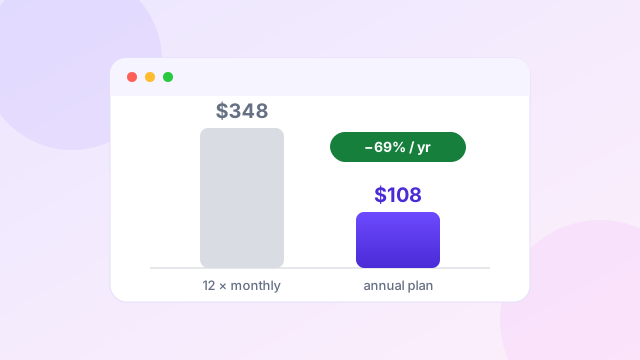
The calculation: $29 × 12 months = $348 · Annual payment = $108 · $348 − $108 = $240 saved (about 69% less than 12 monthly payments).
Eligible students and education users can also request the official 40% education discount — eligibility is decided by Screen Studio. Read our education discount guide.
Check Screen Studio PricingPrice and offer status checked on 20 July 2026. Screen Studio may change its plans. Confirm the final amount at checkout before paying.
Coupon-code status: we did not find a public, general-use Screen Studio coupon code during our 20 July 2026 check. The verified savings are the annual plan and the official education discount.
Current Screen Studio coupons and discount offers #
| Screen Studio offer | What you get | Action |
|---|---|---|
| 1. Screen Studio annual plan costs $9 monthly | Pay $108 once per year and use all current Screen Studio features, including shareable links. | Check annual pricing |
| 2. Screen Studio yearly billing reduces costs by $240 | The $29 monthly plan costs $348 over 12 months. Annual billing costs $108, based on current listed prices. | View the yearly offer |
| 3. Screen Studio education discount gives eligible users 40% off | Users with an education email can request a discount automatically. Other students can send proof of status. | Request education pricing |
| 4. Screen Studio monthly access costs $29 without commitment | Monthly billing is more flexible for a short project, product launch or temporary campaign. | See monthly access |
| 5. Screen Studio download lets Mac users check compatibility | Download the macOS app and confirm that it works on your system before choosing a long billing period. | Visit Screen Studio |
The annual price is the strongest offer for most regular users. The monthly plan makes more sense when you need the app for one or two months and do not know if you will keep making videos.
Is there a working Screen Studio coupon code? #
We did not find a public general-use coupon code on the Screen Studio website during this review. The link on this page is our tracked affiliate link, but an affiliate link does not automatically mean an extra discount code is applied.
The verified ways to pay less are:
- Choose the $108 annual plan instead of paying $29 each month.
- Apply for the official 40% education discount if you qualify.
- Check the final affiliate checkout for any live promotion before payment.
This distinction matters. A coupon code is a string entered at checkout. An annual billing reduction is a price difference between two plans. Both can reduce your cost, but they are not the same thing.
How much does Screen Studio cost? #
Screen Studio currently uses simple subscription pricing. Both public plans include all listed Screen Studio features and shareable links.
| Plan | Billing | Effective monthly price | Approximate yearly cost |
|---|---|---|---|
| Monthly | Charged each month | $29 | $348 over 12 months |
| Annual | Charged once yearly | $9 | $108 |
The annual plan is $240 cheaper across a full year. That works out to roughly 69% less than making 12 monthly payments.
The calculation is simple:
- $29 × 12 months = $348
- Annual payment = $108
- $348 minus $108 = $240 difference
Screen Studio previously sold one-time licences. The current public page focuses on monthly and annual subscriptions. Existing one-time buyers should check their account terms rather than assuming a new lifetime plan is available.
For a full cost and value breakdown, read our Screen Studio pricing guide.
How to use the Screen Studio offer #
There is no complex redemption process for the annual price.
- Open Screen Studio through our affiliate link.
- Check whether the checkout shows monthly and yearly billing.
- Select annual billing if you want the $9 monthly equivalent.
- Review the total payment, currency, tax and renewal terms.
- Complete the purchase only when the final amount matches your expectation.
If you have an education email, use the official education discount request page before buying. Screen Studio says eligible users can receive a code automatically. Students without a recognised education email can contact the company with proof of status.
What does the Screen Studio subscription include? #
Screen Studio is a macOS screen recorder built for product demos, tutorials, courses and short social videos. Its main appeal is that it adds visual polish without making you build every animation by hand.
The current feature set includes:
- automatic zoom based on screen actions;
- manual zooms that are animated for you;
- smooth cursor movement and adjustable cursor size;
- screen, webcam, microphone and system audio recording;
- local transcript generation and subtitles;
- background noise removal and voice normalisation;
- iPhone and iPad recording through a connected Mac;
- backgrounds, spacing, shadows and framing controls;
- horizontal and vertical output layouts;
- video exports up to 4K at 60 frames per second;
- MP4 and optimised GIF export;
- shareable cloud links, including private links and comments;
- masking for sensitive information; and
- background audio, camera layouts and keyboard shortcut display.
The product is simple on purpose. It does not try to replace a full editor such as Final Cut Pro or Camtasia. It handles the common work needed for a good screen demo, then keeps the editing timeline small enough for a founder, marketer or support worker to use.
Why Screen Studio videos look polished #
The automatic zoom system follows actions on the screen and gives viewers a closer look at important details. You can also add or move zoom ranges on the timeline. Screen Studio handles the motion between those ranges.
Cursor smoothing is another quiet feature that makes a large difference. Normal mouse movement can look nervous in a recording. The app changes that movement into a slower visual path. It can enlarge the cursor, hide it when it is not useful and return it to its starting point for a clean loop.
The app also adds a styled frame around the recording. You can change the background, spacing, corners, shadow and inset. When you switch from a horizontal video to a vertical format, Screen Studio adjusts zooms for the new frame.
These automated choices are why the product can feel faster than a standard recorder plus a separate editor. Read our Screen Studio review for the strengths and trade-offs.
Is Screen Studio a cloud recorder? #
Screen Studio is mainly a native macOS recording and editing app. It records your screen locally and can create transcripts on the Mac without sending that transcript data to Screen Studio's servers, according to its official product page.
It also has cloud sharing features. Version 3 introduced shareable links, and later updates added private links, comments and view counts. This makes it possible to record and edit on the Mac, then publish a link for a client or colleague.
It is more accurate to call it a native recorder with cloud sharing than a browser-only cloud recorder. The difference is useful when comparing it with Loom or Tella.
Who should choose the annual offer? #
The $108 annual plan fits people who make screen videos throughout the year:
- SaaS founders recording product updates;
- developers showing new app features;
- marketers making launch clips;
- educators creating lessons and courses;
- support teams building help videos;
- designers sharing prototypes; and
- creators posting software tutorials.
At $9 per month in effective cost, one useful product demo each month may be enough to justify the plan. The real saving comes from reducing editing time, not simply owning another recorder. Our step-by-step Screen Studio guide shows how the workflow fits together.
When the $29 monthly plan makes more sense #
Monthly billing is sensible for a short launch, a course recorded in one month or a temporary client contract. You pay more per month but avoid a full-year commitment.
It is also the safer starting point when you are unsure whether the Mac-only workflow fits your setup. Screen Studio recommends macOS Ventura 13.1 or later. Windows users should choose a cross-platform alternative such as FocuSee, Tella, Loom, OBS Studio or Camtasia.
See our Screen Studio alternatives and Screen Studio vs FocuSee comparison before paying.
Screen Studio education discount #
The official education offer provides 40% off for eligible users. People with an email address from a university or another recognised educational institution can request a code through the official form.
If you do not have an education email, Screen Studio asks you to send proof of student status to its support address. Eligibility is decided by Screen Studio, so do not rely on the discount until you receive the code and see it accepted at checkout.
This offer deserves its own place on the coupon page because it is a real public discount, not a guessed code from a coupon database. Read our full education discount guide for students and teachers for application steps and estimated prices.
Recent Screen Studio updates that add value #
The changelog shows that Screen Studio is still receiving updates. Version 3.7.1, dated 22 May 2026, focused on audio controls, microphone enhancement and shareable link view counting.
Other recent releases added or improved:
- Apple Speech Recognition for transcripts;
- iPhone Mirroring support;
- shareable link comments and private links;
- 4K webcam input;
- background music;
- pause and resume recording;
- masking and highlight tools;
- click sound effects; and
- a 30-minute shareable-link limit.
This update record matters when judging an annual plan. You are not only paying for the current recorder. You are also paying for access to the current subscription product as it changes.
Watch: what you get before you use the discount #
Before paying for any plan, it helps to see the app working. This independent demo and review shows the recording flow, the automatic zoom engine, background framing, aspect-ratio presets and the export settings — the features the annual plan actually buys you.
Video summary: The creator records a window, then walks through the editor: automatic and manual zooms, background and padding controls, cursor styles and sizes, animation physics presets, aspect-ratio switching for YouTube or Instagram, and export settings. Note on pricing: the licence prices mentioned near the end of the video reflect Screen Studio's older lifetime-licence model. The current official pricing is $29 monthly or $108 annually ($9/month), as verified on the checkout on 20 July 2026 — see the tables above.
Our coupon verdict #
The annual Screen Studio plan is the clear value choice for a Mac user who records often. It costs $108 yearly, which is $240 below the cost of keeping the $29 monthly plan for a full year.
There is no need to dress that price difference up as a secret code. The honest offer is strong enough: $9 per month when paid annually, all current features included, plus an official 40% education route for eligible users.
Frequently asked questions #
What is the best Screen Studio coupon?
The strongest verified general saving is the annual plan at $108 per year, equal to $9 per month. It is about $240 cheaper than paying $29 monthly for a full year.
Is there a Screen Studio coupon code?
We did not find a public general coupon code during our 20 July 2026 check. The annual plan and official education discount are the verified saving options.
Does Screen Studio offer a student discount?
Yes. Screen Studio advertises a 40% education discount. Users can request it with an education email or send proof of student status.
Is Screen Studio $9 per month?
Yes, when you select annual billing. You pay $108 for the year. The flexible monthly plan is currently $29 per month.
Does Screen Studio work on Windows?
Screen Studio is designed for macOS, and the official page recommends macOS Ventura 13.1 or later. Windows users should compare FocuSee, Tella, Loom, OBS Studio or Camtasia.
Is Screen Studio cloud based?
It is a native macOS recorder and editor with cloud shareable links. Recording and editing happen in the app, while published videos can be shared through a link.
Does the affiliate link guarantee a discount?
No. It tracks a referral but does not guarantee an extra code. Always check the final price displayed at checkout.
Related guides and comparisons
 Review
Screen Studio Review for Polished Mac Screen Recordings
Automatic zoom, cursor effects, sharing, exports and who it suits.
Review
Screen Studio Review for Polished Mac Screen Recordings
Automatic zoom, cursor effects, sharing, exports and who it suits.
 Pricing
Screen Studio Pricing Explained Before Choosing Your Plan
Monthly vs annual costs, break-even point and what is included.
Pricing
Screen Studio Pricing Explained Before Choosing Your Plan
Monthly vs annual costs, break-even point and what is included.
 Discount
Screen Studio Education Discount for Students and Teachers
How eligible users can request the official 40% education offer.
Discount
Screen Studio Education Discount for Students and Teachers
How eligible users can request the official 40% education offer.
 Comparison
Best Screen Studio Alternatives for Mac and Windows
FocuSee, Tella, Loom, Camtasia, OBS Studio and CleanShot X compared.
Comparison
Best Screen Studio Alternatives for Mac and Windows
FocuSee, Tella, Loom, Camtasia, OBS Studio and CleanShot X compared.
 Tutorial
How to Use Screen Studio From Recording to Export
Setup, permissions, recording, zoom review, editing and export.
Tutorial
How to Use Screen Studio From Recording to Export
Setup, permissions, recording, zoom review, editing and export.
Get the current Screen Studio annual price
Check the final payment and renewal terms before purchase.
Open Screen Studio through our affiliate linkAffiliate link. We may earn a commission at no extra cost to you. Prices checked 20 July 2026.
Sources and editorial note
Pricing, compatibility and product features were checked against the official Screen Studio website and Screen Studio changelog on 20 July 2026. The education offer was checked against the official discount request page. We may earn a commission from purchases made through the affiliate link. Read our editorial policy.