Screen Studio vs Loom for Better Screen Videos
This page contains a Screen Studio affiliate link. We may earn a commission from qualifying purchases. How we earn · Editorial policy

Screen Studio is better for polished product demos and public tutorials on a Mac. Loom is better for fast team messages, viewer comments and videos that need to be shared the moment recording stops.
Both tools record a screen, camera, microphone and system audio. They solve different problems after that. Screen Studio improves the look of the video through automatic zoom, cursor smoothing, backgrounds and easy export. Loom builds a quick communication loop around hosting, comments, reactions, transcripts and team libraries.
Screen Studio vs Loom at a glance #
| Feature | Screen Studio | Loom |
|---|---|---|
| Best for | Product demos, tutorials and launch clips | Async updates, feedback and team communication |
| Platforms | macOS | Browser, Windows, macOS and mobile |
| Automatic zoom | Yes, based on screen actions | Editing and AI enhancement, but not the same zoom-first workflow |
| Cursor treatment | Smooth movement, resize, hide and click effects | Standard screen-recording cursor tools |
| Free plan | No permanent public free plan confirmed | Starter plan at $0 |
| Starting paid price | $108 yearly | $18 per user monthly on Business |
| Sharing | Shareable links, privacy, comments and views | Links, libraries, comments, reactions and team workspaces |
| Editing | Cuts, speed, zooms, masks, layouts and captions | Basic editing on Business and advanced AI editing on higher plan |
| Export quality | Up to 4K 60fps | Depends on Loom plan |
Prices and plan details were checked on 20 July 2026. Confirm live totals before buying.
The core difference #
Screen Studio starts with the final video. It asks how a recording should look once it appears on a landing page, social feed or tutorial. Its automatic camera movement and cursor design reduce the amount of manual editing needed to make a screen feel readable.
Loom starts with the message. It asks how quickly one person can explain something and how easily another person can reply. Its hosted player, notifications, comments, emoji reactions and shared libraries are central to the product.
This is why both tools can be good without being interchangeable. A founder may use Screen Studio for a public feature launch and Loom for a private update to the engineering team.
Recording experience #
Screen Studio is a native Mac app. It can record the full display, a window or a selected area. It also captures a webcam, microphone, all system audio or audio from selected apps. The official site recommends macOS Ventura 13.1 or later.
Loom works across more devices. The browser and desktop options suit teams with Windows and Mac users. Its free Starter plan supports up to 25 videos per person, with five-minute recordings and video quality up to 720p. It also includes screen and camera bubble recording, system audio, virtual backgrounds and speaker notes.
Loom wins on access. Screen Studio wins when a Mac-native capture process and controlled source selection matter.
Automatic zoom and visual style #
Screen Studio automatically places zooms around actions. You can move, resize or remove them on the timeline. It also supports manual zooms and adjusts the animation when you switch to a vertical layout.
The cursor is treated as part of the video. Screen Studio smooths mouse movement, changes cursor size after recording, hides a static cursor and can add click effects or sounds. The screen sits inside a styled frame with a custom background, spacing, shadow and inset.
Loom records a clear walkthrough, but visual polish is not its main reason to buy. Higher Loom plans include auto-video enhancement and advanced editing. Loom AI also offers titles, summaries, chapters, silence removal and filler-word removal. Those tools improve communication and pacing rather than copying Screen Studio's cinematic screen movement.
For a product landing page, Screen Studio usually creates the stronger first impression. For a quick explanation that will be watched once by colleagues, Loom's simpler presentation is often enough.
Editing tools #
Screen Studio gives you a focused timeline for:
- trimming and cutting;
- speeding up slow sections;
- editing automatic and manual zooms;
- adjusting the cursor;
- changing the background and frame;
- cropping the recording;
- adding masks over private information;
- generating captions;
- changing camera layouts; and
- adding background music.
Loom Business includes basic waveform editing, uploads and downloads. Business plus AI adds auto-video enhancement, advanced editing, video-to-text workflows, titles, summaries, chapters, tasks, silence removal and filler-word removal.
Loom has more help for turning a spoken update into written work. Screen Studio has more help for turning a screen action into a good-looking video.
Sharing and collaboration #
Loom is the clear winner for ongoing team communication. The free plan already includes comments and emoji reactions. Paid plans add unlimited videos, recording time and stronger workspace controls. Team libraries help keep videos available after the original message is sent.
Screen Studio now has a useful sharing layer. Its 3.0 release added shareable links. Later versions added private links, comments and view counts. This makes it possible to send a polished demo for review without uploading the file elsewhere.
The difference is scale. Screen Studio's link is an export option. Loom's hosted workspace is the centre of the product.
Use Loom if the conversation around the video matters. Use Screen Studio if the final video matters more than the discussion around it.
Captions and AI tools #
Screen Studio generates transcripts and captions on the Mac. The official page says the transcript is created locally and not sent to Screen Studio's servers. Apple Speech Recognition was added as another option in the changelog.
Loom's free plan currently lists transcripts in more than 50 languages. Business plus AI adds summaries, chapters, tasks, meeting notes and video-to-text automation. This can turn one recording into a message, SOP or follow-up list.
For local transcript processing, Screen Studio has the advantage. For automated communication after recording, Loom offers more.
Pricing compared #
Screen Studio
| Plan | Current price |
|---|---|
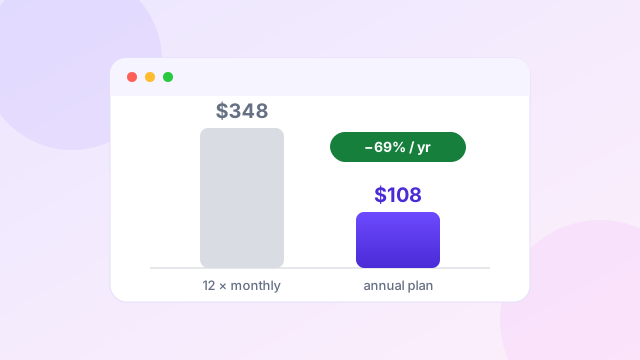
| Monthly | $29 per month |
| Annual | $108 per year |
The annual plan equals $9 per month and includes all current Screen Studio features plus shareable links.
Loom
| Plan | Current price | Main limits or additions |
|---|---|---|
| Starter | $0 | 25 videos, five-minute recordings, up to 720p |
| Business | $18 per user monthly | Unlimited videos and recording time, basic editing |
| Business plus AI | $24 per user monthly | AI enhancement, advanced editing and automation |
| Enterprise | Custom | Advanced security and organisation controls |
The Loom pricing page allows monthly or annual selection and advertises up to 17% annual savings. The figures above reflect the page state seen during this review and can change with billing selection.
Loom is cheaper to try because it has a real free plan. Screen Studio offers stronger value for one regular Mac creator on the $108 annual plan. Loom costs rise with each paid user, while Screen Studio's public pricing is presented as an individual subscription.
Read our Screen Studio pricing guide and Screen Studio coupon page for the current annual calculation.
Product demos and launch videos #
Screen Studio wins this use case. Automatic zoom keeps small interface details readable. Cursor smoothing makes the action appear planned. Background and aspect-ratio controls prepare the same recording for a landing page, LinkedIn post or vertical clip.
Loom can record a product demo, and its link is convenient. The result feels more like a personal walkthrough. That may be exactly right for a sales prospect or private onboarding message. It may look less finished on a public product page.
Our Screen Studio product demo guide explains how to plan the stronger public version.
Support videos and internal updates #
Loom wins when a support agent needs to record, send and move on. The customer can comment at the right moment. A teammate can respond with a reaction. The video stays in a shared space.
Screen Studio needs more care, but the final video can be reused in a help centre or public documentation. Its masking tool is helpful when private data appears on screen.
Use Loom for disposable or conversational videos. Use Screen Studio for support content that will be watched many times.
Which should you choose? #
Choose Screen Studio if…
- you make public-facing demos or tutorials;
- you work on macOS;
- automatic zoom and cursor quality matter;
- you need vertical and horizontal exports; or
- you want a short route to a designed video.
Choose Loom if…
- you need a free starting plan;
- your team uses Windows and Mac;
- comments and reactions matter;
- most videos are internal messages; or
- you want AI summaries and written follow-ups.
Prefer polished Mac screen videos?
Screen Studio currently costs $108 yearly or $29 monthly.
Check Screen Studio through our affiliate linkAffiliate link. We may earn a commission at no extra cost to you.
Watch: Loom and Screen Studio side by side #
This short independent comparison shows both recorders in action — Loom's instant shareable link workflow versus Screen Studio's separate camera and screen tracks and cinematic zoom effects. It is a fast way to see the difference this page describes in text.
Video summary: The creator records with both apps. Loom is shown as the faster share-a-link tool that also works on Windows and mobile; Screen Studio is shown recording camera and screen on separate tracks with cinematic zoom effects, and is noted as macOS-only. The video quotes Loom at $15/month and Screen Studio's annual rate at $9/month — matching the pricing we verified above (published October 2024; always confirm the current price at checkout). A third tool is briefly pitched at the end, which you can ignore for this comparison.
Frequently asked questions #
Is Screen Studio better than Loom?
Screen Studio is better for polished Mac product demos. Loom is better for quick cross-platform messages, comments and team libraries.
Does Loom have a free plan?
Yes. Loom Starter currently allows 25 videos per person, five-minute recordings and up to 720p video.
Does Screen Studio have sharing links?
Yes. Screen Studio supports shareable links, private links, comments and view counts.
Which tool is better for product demos?
Screen Studio is normally better for a public demo because it automates zoom, cursor movement, framing and social layouts.
Which tool is better for remote teams?
Loom is better for everyday remote communication because hosted videos, comments, reactions and shared libraries are central features.
Can Windows users use Screen Studio?
Screen Studio is designed for macOS. Windows users should consider Loom, FocuSee, Tella or Camtasia.
Related comparisons and guides
 Tutorial
How to Make Product Demos With Screen Studio
Plan, record, edit and export a clear product demo.
Tutorial
How to Make Product Demos With Screen Studio
Plan, record, edit and export a clear product demo.
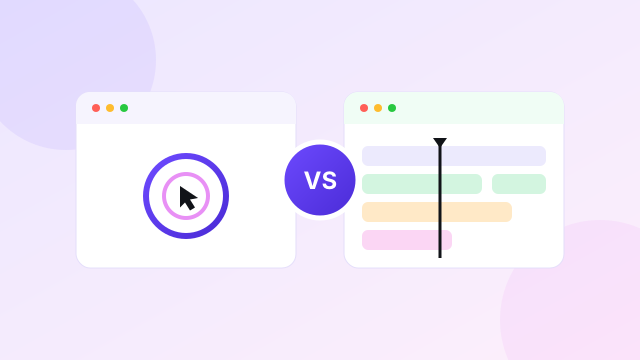 Comparison
Screen Studio vs Camtasia for Tutorial Video Creation
Automatic polish versus a full multi-track editor.
Comparison
Screen Studio vs Camtasia for Tutorial Video Creation
Automatic polish versus a full multi-track editor.
 Pricing
Screen Studio Pricing Explained Before Choosing Your Plan
Monthly vs annual costs and the break-even point.
Pricing
Screen Studio Pricing Explained Before Choosing Your Plan
Monthly vs annual costs and the break-even point.
 Comparison
Best Screen Studio Alternatives for Mac and Windows
FocuSee, Tella, Loom, Camtasia and OBS Studio compared.
Comparison
Best Screen Studio Alternatives for Mac and Windows
FocuSee, Tella, Loom, Camtasia and OBS Studio compared.
Sources and editorial note
This comparison was checked against the official Screen Studio product page, Screen Studio comparison page and Loom pricing page on 20 July 2026. We did not claim hands-on tests that were not completed. The Screen Studio link is an affiliate link. Read our editorial policy.