Screen Studio Pricing Explained Before Choosing Your Plan
This page uses affiliate links. We may earn a commission from qualifying purchases. How we earn · Editorial policy
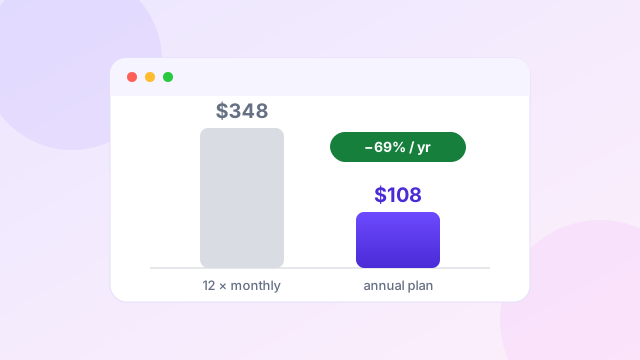
Screen Studio costs $29 per month on flexible monthly billing or $108 per year on annual billing. The annual price is shown as $9 per month, but the full $108 is charged for the year.
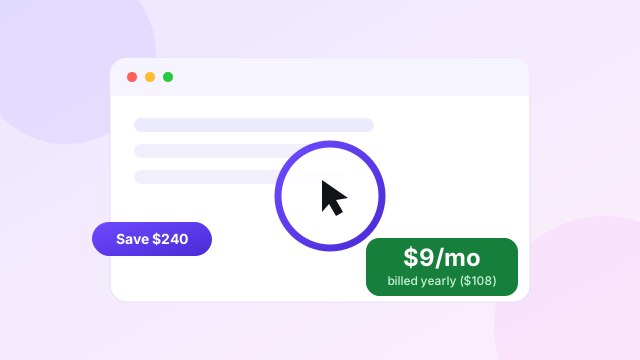
If you keep the monthly plan for 12 months, you pay $348. The annual plan therefore costs $240 less, a reduction of about 69% based on the current public prices.
Choose the $108 annual plan if you expect to make product demos, tutorials or screen videos throughout the year.
Check Screen Studio PricingPricing checked on 20 July 2026. Taxes, local currency and plan details may change at checkout.
Screen Studio pricing table #
| Plan | Billing amount | Effective monthly cost | Features |
|---|---|---|---|
| Monthly | $29 each month | $29 | All Screen Studio features and shareable links |
| Annual | $108 each year | $9 | All Screen Studio features and shareable links |
The feature list is the same on the public pricing section. The main difference is the billing commitment.
How much do you save with yearly billing? #
Paying monthly for a full year costs:
$29 × 12 = $348
Paying yearly costs:
$108
The difference is:
$348 minus $108 = $240
The annual plan is therefore the sensible choice once you expect to use Screen Studio for four months or more. Four monthly payments cost $116, already $8 above the annual price.
| Expected use | Monthly payments | Annual plan | Better choice |
|---|---|---|---|
| 1 month | $29 | $108 | Monthly |
| 2 months | $58 | $108 | Monthly |
| 3 months | $87 | $108 | Monthly |
| 4 months | $116 | $108 | Annual |
| 6 months | $174 | $108 | Annual |
| 12 months | $348 | $108 | Annual |
This break-even point is more useful than the advertised percentage. If you need the app for a one-off launch, monthly is cheaper. If it becomes part of your normal work, annual billing wins quickly.
What is included in the price? #
Both current plans include the complete Screen Studio feature set and shareable links. Key functions include:
- automatic and manual zoom;
- smooth cursor movement;
- cursor resizing, hiding and click effects;
- screen, webcam and microphone recording;
- selected-app or full-system audio capture;
- on-device transcript generation and subtitles;
- audio normalisation and noise removal;
- iPhone and iPad recording through a Mac;
- backgrounds, spacing, shadows and inset controls;
- horizontal and vertical layouts;
- trim, cut and speed controls;
- sensitive-data masks and highlights;
- background audio and camera layouts;
- MP4 and GIF export;
- output up to 4K at 60fps; and
- cloud shareable links.
There are no separate public feature tiers on the current pricing block. You are choosing billing length, not a basic or premium feature package.
Monthly pricing is best for short projects #
The $29 monthly plan fits a short, fixed need. Examples include:
- recording a new course in one month;
- making launch videos for a SaaS release;
- preparing a client demo library;
- testing the app inside a team; or
- replacing a broken recording workflow for a short period.
It also reduces risk if you are unsure about the Mac-only requirement. Screen Studio recommends macOS Ventura 13.1 or later. Download the app and confirm your machine, camera, microphone and export workflow before committing to a year.
Monthly billing becomes expensive when it continues by habit. Set a reminder before renewal. If the app is useful after three months, the annual plan will normally cost less from that point.
Annual pricing is best for steady video work #
The $108 annual plan fits users who record every month. SaaS founders, educators, designers, developers, marketers and support teams are the clearest examples.
At an effective $9 per month, Screen Studio does not need to replace much editing time to justify its cost. Automatic zoom and cursor smoothing can remove several manual steps from each video. The strongest value is not storage or recording length. It is the speed from raw capture to a presentable result.
The annual plan also includes shareable links, which can replace manual file uploads for short client reviews or internal demos. Check current limits before planning a large hosted video library. The changelog has listed a 30-minute shareable-link limit.
Does Screen Studio offer a lifetime licence? #
Screen Studio sold one-time licences in the past, and the current FAQ still refers to people who purchased one. However, the public pricing section reviewed in July 2026 lists monthly and annual subscriptions rather than a new lifetime purchase.
Do not publish an old lifetime price as a current deal without seeing it at checkout. Existing owners should check their account because their licence and update terms can differ from the present subscription.
This is important for coupon SEO. Old price snippets can stay in search results after an offer ends. A trustworthy pricing page must separate historical plans from current purchase options.
Screen Studio education pricing #
Screen Studio offers an official 40% education discount. Users with a recognised university or educational email address can request a discount code through the official form.
People without an education email can send proof of student status to Screen Studio. Approval is controlled by the company. Ask for the code before buying and confirm that it changes the final amount. Our education discount guide walks through both application routes and the estimated discounted prices.
For current saving options, read our Screen Studio coupon page.
Is Screen Studio expensive? #
The answer depends on what you compare.
It is expensive when you only need basic screen capture. macOS includes recording tools, and OBS Studio is free. Screen Studio's $29 monthly price is hard to justify for a few raw clips.
It is reasonably priced when you need polished demos each week. The $108 annual plan competes with screen recorders that charge for hosting, AI tools, team seats or a larger editor. Screen Studio includes its core visual tools in one plan.
The app should be judged against editing time. If one video normally takes an extra hour to zoom, frame, resize and polish, automatic treatment can be worth more than the licence. Our full Screen Studio review covers where that time saving comes from.
Screen Studio pricing compared with alternatives #
| Tool | Current starting point | Main pricing difference |
|---|---|---|
| Screen Studio | $108 yearly | Focused Mac recorder with all features |
| FocuSee | $49.99 yearly Standard | Windows and Mac, AI features may use credits |
| Tella | From $13 monthly | Web, Mac and Windows with hosting and analytics |
| OBS Studio | Free | Open source, but needs more setup and editing |
| Loom | Free tier available | Strong async sharing and team communication |
| Camtasia | Annual subscription | Larger recording and editing suite |
Competitor prices checked 20 July 2026 on official pages; they can change at any time.
Prices change, and the products are not identical. FocuSee offers lower starting annual pricing and Windows support. Tella adds a browser workflow and stronger hosting tools. Loom puts sharing first. Camtasia gives more editing depth. Screen Studio focuses on automatic visual polish for Mac.
Read our best Screen Studio alternatives before choosing based only on price.
Which Screen Studio plan should you choose? #
Choose monthly when…
- you only need one to three months;
- you are testing whether the workflow suits you;
- your Mac setup may change soon; or
- a single project covers the cost.
Choose annual when…
- you will use it for four months or more;
- screen video is part of your regular work;
- you publish product demos or tutorials often; or
- you want the lowest effective monthly price.
If you qualify for education pricing, request that offer before choosing either plan.
Check the current plan total
Screen Studio's annual plan is currently $108, equal to $9 per month.
Open Screen Studio pricingAffiliate link. We may earn a commission at no extra cost to you.
Watch: how Screen Studio's pricing model has changed #
Screen Studio used to be sold as a one-time licence before moving to today's subscription model. This independent review, recorded in early 2025, shows the app in the transition period and discusses both the subscription and the lifetime option — useful context for understanding what today's $108 annual plan replaced.
Video summary: The reviewer demonstrates recording and editing, then covers pricing, mentioning both subscription options and a lifetime deal available at the time of recording (January 2025). Current state: the official checkout now lists $29 monthly and $108 annually ($9/month effective) — verified 20 July 2026 in the tables above. Treat any older one-time-purchase figures in videos as historical.
Frequently asked questions #
How much is Screen Studio per month?
Monthly billing is $29. Annual billing is shown as $9 per month and charged as $108 for the year.
Is Screen Studio billed monthly or yearly?
Both options are available. The annual plan requires a single yearly payment.
Does Screen Studio have a free plan?
The current public pricing focuses on paid monthly and annual plans. Check the download and checkout pages for any trial conditions before purchase.
Is there a Screen Studio lifetime deal?
Past customers may hold one-time licences, but the current public pricing reviewed in July 2026 lists subscriptions. Do not assume an old lifetime price is still available.
Does Screen Studio have student pricing?
Yes. Eligible education users can request an official 40% discount.
Is the annual plan worth it?
It is cheaper once you expect to use Screen Studio for four months or longer. Four monthly payments cost $116, compared with $108 for one year.
Related guides
 Offers
Screen Studio Coupon and Current Annual Plan Savings
The verified savings and current coupon-code status.
Offers
Screen Studio Coupon and Current Annual Plan Savings
The verified savings and current coupon-code status.
 Discount
Screen Studio Education Discount for Students and Teachers
How eligible users request the official 40% offer.
Discount
Screen Studio Education Discount for Students and Teachers
How eligible users request the official 40% offer.
 Review
Screen Studio Review for Polished Mac Screen Recordings
Strengths, trade-offs and who the app suits.
Review
Screen Studio Review for Polished Mac Screen Recordings
Strengths, trade-offs and who the app suits.
 Comparison
Best Screen Studio Alternatives for Mac and Windows
FocuSee, Tella, Loom, Camtasia and OBS Studio compared.
Comparison
Best Screen Studio Alternatives for Mac and Windows
FocuSee, Tella, Loom, Camtasia and OBS Studio compared.
Sources and editorial note
Pricing and features were checked against the official Screen Studio website and official changelog on 20 July 2026. Education details came from the official request page. This page includes an affiliate link, which may earn us a commission. Read our editorial policy.