Screen Studio vs FocuSee for Automatic Product Videos
This comparison includes a Screen Studio affiliate link. We may earn a commission if you purchase through it. How we earn · Editorial policy
Choose Screen Studio if you use a Mac and want the cleanest focused workflow for polished product demos. Choose FocuSee if you need Windows support, lower starting annual pricing or more AI-assisted editing tools.
Both recorders add automatic zoom and cursor effects after you capture the screen. The main difference is direction. Screen Studio keeps the editor small and Mac-native. FocuSee aims to be a wider AI video tool for Windows and Mac.
Screen Studio vs FocuSee quick comparison #
| Feature | Screen Studio | FocuSee |
|---|---|---|
| Platforms | macOS | Windows and macOS |
| Automatic zoom | Yes | Yes |
| Cursor smoothing and effects | Yes | Yes |
| Screen and webcam | Yes | Yes |
| System audio | Yes | Yes |
| iOS device capture | Yes, through Mac | Mobile device recording listed |
| Subtitles | Local transcript generation | AI subtitles in 55+ languages listed |
| Audio improvement | Noise removal and normalisation | Noise reduction and credit-based AI tools |
| Camera layouts | Yes | Yes |
| Sensitive data tools | Masks and highlights | Blur masking and annotations |
| Cloud sharing | Shareable links | 5GB storage on listed paid plans |
| Maximum export | Up to 4K 60fps | Up to 4K 60fps |
| Starting annual price | $108 yearly | $49.99 yearly Standard |
| Monthly price | $29 | $19.99 Standard |
Prices and features were checked on 20 July 2026. Some FocuSee features launch on Mac before Windows, so check the label for the exact tool you need.
The short verdict #
Screen Studio is better at one job: turning a Mac screen recording into a well-framed product video with little effort. Its automatic zoom, cursor path, backgrounds and export presets feel like parts of the same design system.
FocuSee covers more jobs. It adds AI subtitles, filler and silence removal, voice tools, background removal, annotations, a teleprompter, 3D movement and avatar options. Some functions use credits, and some are not yet equal across Windows and Mac.
If you are on Windows, the decision is easy because Screen Studio is not the full Windows option. If you are on a Mac, choose between focus and breadth.
Automatic zoom #
Both products use screen actions to guide the viewer.
Screen Studio automatically zooms around actions and lets you move or add zoom ranges on the timeline. It animates manual selections and adjusts the framing when you change to a vertical social format. The zoom system works closely with cursor smoothing, background spacing and its simple editor.
FocuSee adds auto zoom around clicks and typing sections. It also offers 3D motion that can tilt the view as the cursor moves. The official page notes that typing-section zoom is available on Mac first, with Windows support planned.
Screen Studio's zoom feels best for clean SaaS demos and interface tours. FocuSee gives you more visual treatments, which suits marketing clips and tutorial creators who like extra movement.
Cursor effects #
Screen Studio smooths shaky mouse movement, changes cursor size after recording and can hide the cursor when it stops adding value. It replaces known system cursors with high-resolution versions and supports click effects and sounds.
FocuSee also includes cursor movement tracking, cursor styles, highlights, sounds and click animation. Its wider annotation set can add text, shapes, arrows, spotlights and blur.
Both make a desktop action clearer on a small screen. Screen Studio keeps the result restrained. FocuSee gives you more ways to draw attention.
Recording and audio #
Screen Studio records the Mac display, selected window or area, camera, microphone and system audio. You can select which app's audio to capture. It can also record an iPhone or iPad connected to a Mac and place the device in a matching frame.
FocuSee records screen, webcam, microphone, system audio and mobile devices. It also lists a teleprompter, camera beautification and background removal. Some of those tools are stronger for people who stay on camera for a large part of the video.
For voice quality, Screen Studio normalises volume and reduces noise. Its recent changelog contains several fixes and improvements for microphone channels and exported audio.
FocuSee provides noise reduction across plans. Its Advanced plans add credit-based functions such as AI voice enhancement, filler-word removal and silence removal.
Choose Screen Studio for a simple audio clean-up path. Choose FocuSee when AI speech editing is central and you are comfortable managing credits.
Subtitles and transcription #
Screen Studio can generate a transcript and use it as subtitles. The official site says this process happens on the device and does not send transcript data to Screen Studio's servers. A recent release also added Apple Speech Recognition.
FocuSee lists automatic subtitles in more than 55 languages and advanced subtitle editing. On the current pricing page, AI subtitle generation uses credits on Advanced plans or requires separate credits on Standard.
The better option depends on the task. Screen Studio has a clear local-processing benefit. FocuSee is stronger on language range and AI subtitle controls.
Editing tools #
Screen Studio covers trimming, cuts, speed changes, zooms, camera layouts, crop, masks, background audio and visual framing. Its timeline is built for quick decisions.
FocuSee includes many of the same core controls, then adds annotations, spotlight, 3D motion, background tools, watermarking, teleprompter, subtitle editing and AI clean-up. That larger feature set gives more flexibility but also creates more plan and credit questions.
Neither replaces a full editor for complex multi-track production. Camtasia, Final Cut Pro or DaVinci Resolve is a better fit when a project uses many video clips, layered graphics and detailed sound design. See our Screen Studio vs Camtasia comparison for that decision.
Cloud sharing #
Screen Studio creates shareable links from the native Mac app. Version 3 introduced the feature, and later updates added private links, comments and view counts. The changelog has listed a 30-minute limit for shareable links.
FocuSee's Standard and Advanced plans currently list 5GB of cloud storage. This supports a cloud library rather than only local files. Check current sharing, access and storage rules if you plan to use it as a team video host.
Screen Studio's sharing layer is useful for a client review after local editing. FocuSee may suit a user who wants storage included in the plan. Neither is as centred on async workplace communication as Loom.
Export quality #
Both tools list export up to 4K at 60fps. That is more than enough for most SaaS demos and tutorials.
Screen Studio also creates optimised GIFs and can copy videos to the clipboard. It includes presets for web, social video and further editing. Horizontal and vertical layouts can be changed with automatic zoom adjustment.
FocuSee exports high-quality videos, supports social resizing and provides custom watermark controls. The practical quality will still depend on your source resolution, frame rate, text size and compression choice.
Do not choose based on "4K" alone. For a product demo, readable interface text and steady zoom matter more than an oversized file.
Platform support #
Screen Studio is built for macOS. The official page recommends macOS Ventura 13.1 or later.
FocuSee supports Windows and macOS. This is its clearest win. A company with mixed computers can use one product rather than creating separate workflows.
There is a detail to check: some new FocuSee features arrive on Mac before Windows. Its official page currently marks typing-section zoom, callouts, background audio, camera beautification and advanced subtitle editing as Mac-first or Windows-coming-soon features.
Windows support is therefore broad but not always identical feature for feature.
Pricing compared #
Screen Studio pricing
| Plan | Price |
|---|---|
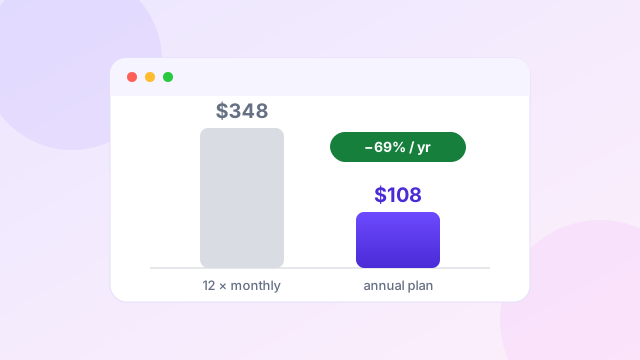
| Monthly | $29 per month |
| Annual | $108 per year |
The annual plan equals $9 per month and includes all listed Screen Studio features plus shareable links.
FocuSee pricing
| Plan | Price | Key limit |
|---|---|---|
| Standard annual | $49.99 yearly | One computer, no included AI credits |
| Standard monthly | $19.99 monthly | One computer |
| Advanced annual | $79.99 yearly | Up to three computers, 3,600 yearly credits |
| Advanced monthly | $24.99 monthly | Up to three computers, 300 monthly credits |
| Advanced one-time | $199.99 | FocuSee 2.x, five computers, 1,000 credits valid one year |
Prices checked 20 July 2026 on official pricing pages.
FocuSee is cheaper at the entry level. Even its current Advanced annual plan costs less than Screen Studio's annual plan. Screen Studio answers that gap with a simpler all-feature package and a focused Mac experience.
Read our Screen Studio pricing guide for the break-even calculation.
Which is better for product demos? #
Screen Studio is our pick for a Mac-based SaaS founder who wants a polished interface demo with minimal setup. Its restrained design, automatic framing and cursor treatment make the output look consistent.
FocuSee is better for a Windows founder or a marketer who wants subtitles, annotations, AI audio work, background removal and more direct visual tools inside the same product.
Which is better for tutorials and courses? #
FocuSee has a stronger feature list for teaching. The teleprompter, annotations, captions, filler-word removal, silence trimming and camera tools help with spoken lessons.
Screen Studio remains a good choice for short software tutorials and course sections recorded on Mac. Its keyboard shortcut display, local transcript and iOS capture are useful. For long modules or many clips, Tella or Camtasia may offer a better structure.
Which should you buy? #
Choose Screen Studio if…
- you work entirely on a Mac;
- you value a simple and polished editor;
- automatic zoom and cursor quality are the main reasons to buy;
- you record SaaS products or iOS apps; or
- local transcript generation matters.
Choose FocuSee if…
- you need Windows support;
- a lower annual price matters;
- AI subtitles, speech clean-up or background tools are useful;
- you want annotations and a teleprompter; or
- several computers need access under an Advanced plan.
Prefer Screen Studio for your Mac workflow?
The annual plan is currently $108, billed as $9 per month.
Check Screen Studio through our affiliate linkAffiliate link. We may earn a commission at no extra cost to you.
For more choices, see our Screen Studio alternatives guide and full Screen Studio review.
Watch: FocuSee and Screen Studio compared on camera #
This independent video puts both auto-editing recorders side by side: platform availability, the automatic zoom output, click-sound options and the licensing differences. It is a useful visual companion to the tables above.
Video summary: Over roughly ten minutes, the reviewer confirms the core difference this page describes: FocuSee runs on Windows, macOS and iOS, while Screen Studio is macOS-only. Both apply automatic zooms. The video also compares licensing — a FocuSee lifetime deal against Screen Studio's update-limited licence — and demonstrates FocuSee's mouse-click sound options. Note that the specific deal prices quoted in the video are from an earlier promotion and may no longer be available; use the current official pricing shown in our table above.
Frequently asked questions #
Is FocuSee the same as Screen Studio?
No. They are separate products. Both automate zooms and cursor effects, but FocuSee supports Windows and Mac and includes a wider set of AI tools.
Is FocuSee cheaper than Screen Studio?
Yes, based on current public annual prices. FocuSee Standard starts at $49.99 per year, while Screen Studio costs $108 per year.
Does Screen Studio work on Windows?
Screen Studio is designed for macOS. FocuSee supports both Windows and macOS.
Which tool has better automatic zoom?
Screen Studio has a focused and restrained zoom workflow for Mac demos. FocuSee adds auto zoom plus optional 3D motion and more attention tools. The best choice depends on the visual style you prefer.
Does FocuSee use AI credits?
Some AI functions use credits. Standard users may need to buy credits separately, while Advanced plans include a set amount.
Which tool is better for cloud sharing?
Screen Studio provides shareable links with privacy, comments and view counts. FocuSee lists 5GB cloud storage on paid plans. Check current limits for your expected volume.
Related comparisons and guides
 Comparison
Best Screen Studio Alternatives for Mac and Windows
FocuSee, Tella, Loom, Camtasia, OBS Studio and CleanShot X.
Comparison
Best Screen Studio Alternatives for Mac and Windows
FocuSee, Tella, Loom, Camtasia, OBS Studio and CleanShot X.
 Pricing
Screen Studio Pricing Explained Before Choosing Your Plan
Monthly vs annual costs and the break-even point.
Pricing
Screen Studio Pricing Explained Before Choosing Your Plan
Monthly vs annual costs and the break-even point.
 Review
Screen Studio Review for Polished Mac Screen Recordings
Strengths, trade-offs and who the app suits.
Review
Screen Studio Review for Polished Mac Screen Recordings
Strengths, trade-offs and who the app suits.
 Comparison
Screen Studio vs Loom for Better Screen Videos
Polished demos versus fast async team communication.
Comparison
Screen Studio vs Loom for Better Screen Videos
Polished demos versus fast async team communication.
Sources and editorial note
This comparison uses current information from the official Screen Studio website, Screen Studio changelog, FocuSee product page and FocuSee pricing page checked on 20 July 2026. We did not invent benchmark results or claim hands-on testing that was not completed. The Screen Studio checkout link is an affiliate link. Read our editorial policy.