Screen Studio Education Discount for Students and Teachers
This page includes a Screen Studio affiliate link. We may receive a commission from qualifying purchases. How we earn · Editorial policy

Screen Studio offers an official 40% education discount. People with an email address from a university or another educational institution can request a discount code automatically. If you do not have a recognised education email, Screen Studio asks you to send proof of student status, such as a student ID, to its support team.
Approval is not automatic. The company controls approval and code eligibility. Request the discount before paying and confirm that the final checkout price changes.
Screen Studio student discount summary #
| Education offer detail | Current information | Action |
|---|---|---|
| 1. Screen Studio education users receive 40% off | The official request page advertises a 40% discount for qualifying users with education status. | Request the education code |
| 2. University email provides the fastest application route | Enter a recognised institution email to receive the Screen Studio discount code automatically. | Open the official form |
| 3. Student ID can support a manual request | People without an education email can contact Screen Studio and submit proof of current student status. | Read the requirements |
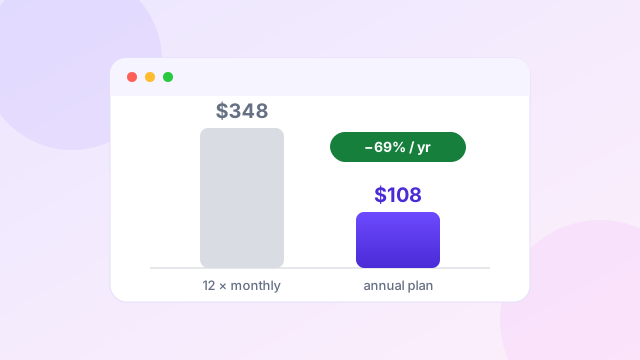
| 4. Annual billing already lowers the standard yearly cost | The public annual plan costs $108, compared with $348 across 12 monthly payments. | Check current pricing |
Offer and public pricing checked on 20 July 2026. Approval, tax, currency and code application can change the final payment.
Who can request the education discount? #
The official page refers to users with an email address from a university or another educational institution. It also gives a manual path for people who can prove student status without such an email.
The page does not publish a complete list of accepted schools, countries, course types or staff roles. Do not assume every teacher, trainer, bootcamp student or school employee is approved. Submit the request and wait for Screen Studio's answer.
Likely evidence may include:
- a current university or school email address;
- a student identification card;
- an enrolment letter;
- a current course portal record; or
- another dated document that confirms student status.
Send only the information needed for verification. Hide unrelated numbers or personal details where possible. Screen Studio may request a clearer document if the first proof is not enough.
How to request the Screen Studio education code #
Method 1 — Use an education email
- Open the official education discount page.
- Enter your university or institutional email address.
- Submit the form.
- Check the inbox and spam folder for the code or verification message.
- Open the official Screen Studio checkout.
- Enter the code where requested.
- Confirm that the 40% reduction appears before payment.
This is the quickest route because the email domain can be checked automatically.
Method 2 — Send proof of student status
If your education email is not accepted or you do not have one, the official page says to email confirmation of your student status to team@screen.studio.
Use a clear subject such as "Education discount request". Briefly state your institution and course, then attach the requested proof. Do not send passwords, full identity records or unrelated documents.
Wait for approval and a code. A document sent to support does not guarantee a discount.
What could Screen Studio cost after 40% off? #
Screen Studio currently lists standard pricing at $29 per month or $108 per year. A straight 40% calculation gives the following estimates:
| Standard price | 40% reduction | Estimated price after discount |
|---|---|---|
| $29 monthly | $11.60 | $17.40 monthly |
| $108 yearly | $43.20 | $64.80 yearly |
These are mathematical examples, not a promise that the code applies to every plan or billing option. The checkout may handle rounding, tax, currency and eligibility differently. Use the amount displayed after the code is applied.
If the 40% code applies to the annual plan, the effective cost would be about $5.40 per month. That is a strong price for students making software tutorials, app demonstrations or course videos on a Mac.
Can the student discount combine with annual pricing? #
The public education page confirms 40% off but does not explain every stacking rule. Do not assume that the code combines with annual billing until the checkout accepts it.
Try the code on the plan you want and check the order summary. If the discount fails, contact Screen Studio before buying. Do not place an order at full price and expect an automatic adjustment later.
Our Screen Studio coupon guide covers the difference between the annual price reduction and a true checkout code.
Why Screen Studio suits education work #
Screen Studio is useful for lessons that show software, websites, code or an iPhone app. It can record a Mac display, window or selected area with microphone, camera and system audio.
Automatic zoom brings small menus and form fields closer to the viewer. Cursor smoothing makes a hurried mouse path easier to follow. Keyboard shortcuts can appear in the video, which helps software training.
The app can also:
- create local transcripts and captions;
- speed up typing sections;
- cut mistakes and pauses;
- hide sensitive data with masks;
- add a webcam view;
- switch between camera layouts;
- record sound from selected apps;
- export horizontal or vertical versions;
- create MP4 video or GIF files; and
- publish shareable links for comments.
These features can reduce editing time for assignments, tutorials and course material. Screen Studio is not a learning management system. It creates the video; another service may still be needed for lessons, enrolment, quizzes or student progress.
Mac requirement for students #
Screen Studio is designed for macOS, and the official site recommends Ventura 13.1 or later. Check your device before requesting or buying.
This matters in schools with shared Windows computers. A 40% discount does not help if the product cannot run on the available machine.
Windows students can compare:
- FocuSee for automatic zoom and AI editing;
- Tella for browser, Windows and Mac recording;
- Loom for a free starting plan and quick links;
- Camtasia for structured tutorial editing; or
- OBS Studio for free recording on Windows, Mac and Linux.
See our Screen Studio alternatives guide for the full comparison.
Screen Studio versus free student tools #
macOS can record a screen without another purchase. OBS Studio is also free. Loom has a Starter plan with 25 videos and five-minute recordings.
Screen Studio costs money because it automates the visual treatment after recording. The student should ask whether that polish matters.
Screen Studio is worth considering when…
- a course requires frequent software demonstrations;
- the work will appear in a portfolio;
- tutorial videos are published publicly;
- a student is building a SaaS product; or
- editing time is limited.
A free recorder is enough when…
- the video is a one-time submission;
- raw capture is accepted;
- the institution supplies another editor; or
- the computer does not meet Screen Studio requirements.
Common education discount problems #
The email is not recognised
Some institutions use unusual domains. Use the manual verification route and explain the school clearly.
The code does not change the price
Check spelling, expiry and plan eligibility. Remove spaces added during copying. If it still fails, contact Screen Studio before payment.
The code arrived after purchase
Do not assume a past order will be reduced. Ask support what options exist. The safest approach is to receive and test the code first.
The annual total looks different
Tax, local currency or code rules may change the total. The order summary is the final source for the amount charged.
Is the education offer the best Screen Studio deal? #
For an eligible user, it may be. A 40% discount is stronger than the ordinary $108 annual price alone if the code applies to that plan.
For someone who does not qualify, annual billing is the best verified public saving. It lowers the cost by $240 compared with keeping the $29 monthly plan for 12 months. See the full breakdown in our pricing guide.
Check standard Screen Studio pricing
Use the official education form first if you qualify. Then confirm the code at checkout.
Open Screen Studio through our affiliate linkAffiliate link. We may earn a commission at no extra cost to you.
Frequently asked questions #
How much is the Screen Studio student discount?
The official education page advertises 40% off for eligible users.
Do I need a university email?
It is the fastest route, but Screen Studio says students without one can send proof of status to support.
Can teachers get the discount?
The page refers broadly to education institutions but does not publish full teacher eligibility. Submit a request and rely on Screen Studio's decision.
Does the code work on the annual plan?
The public page does not state every stacking rule. Enter the code and confirm the final annual total before payment.
How long does verification take?
Automatic email verification may be quick. Manual proof requires a support review, and no fixed time is promised on the page.
Is Screen Studio available on Windows?
Screen Studio is designed for macOS. Windows students should consider FocuSee, Tella, Loom, Camtasia or OBS Studio.
Related guides
 Offers
Screen Studio Coupon and Current Annual Plan Savings
The verified savings and current coupon-code status.
Offers
Screen Studio Coupon and Current Annual Plan Savings
The verified savings and current coupon-code status.
 Pricing
Screen Studio Pricing Explained Before Choosing Your Plan
Monthly vs annual costs and the break-even point.
Pricing
Screen Studio Pricing Explained Before Choosing Your Plan
Monthly vs annual costs and the break-even point.
 Comparison
Best Screen Studio Alternatives for Mac and Windows
Options for Windows students and free recorders.
Comparison
Best Screen Studio Alternatives for Mac and Windows
Options for Windows students and free recorders.
 Tutorial
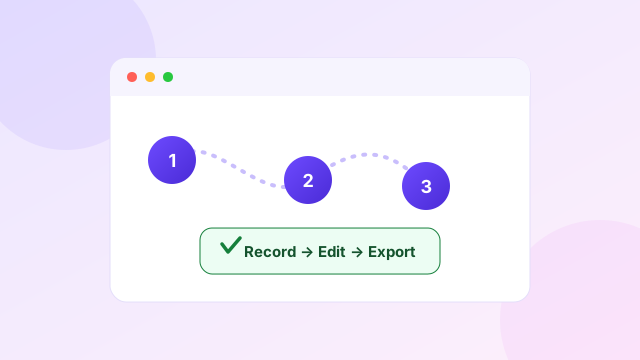
How to Use Screen Studio From Recording to Export
Setup, permissions, recording, editing and export.
Tutorial
How to Use Screen Studio From Recording to Export
Setup, permissions, recording, editing and export.
Sources and editorial note
Education terms were checked on the official Screen Studio education discount page on 20 July 2026. Standard pricing came from the official Screen Studio website. The estimated discounted prices are calculations, not guaranteed checkout totals. The purchase link is an affiliate link. Read our editorial policy.