Best Screen Studio Alternatives for Mac and Windows
This guide contains affiliate links. We may earn a commission from qualifying purchases. How we earn · Editorial policy

FocuSee is the closest Screen Studio alternative for users who want automatic zoom on Windows and Mac. Tella is better for browser recording, teams and hosted videos. Loom is the easiest choice for quick async messages. Camtasia is better for full editing, while OBS Studio is the strongest free option.
Screen Studio remains a strong choice for Mac users who want polished product demos with little editing. The right alternative depends on what you are missing: Windows support, lower pricing, deeper editing, team comments, browser capture or streaming.
Screen Studio alternatives compared #
| Tool | Best for | Platforms | Main advantage over Screen Studio |
|---|---|---|---|
| FocuSee | Automatic product-demo editing | Windows and Mac | Cross-platform support and more AI tools |
| Tella | Courses, teams and hosted videos | Web, Windows and Mac | Clip recording, analytics and longer hosted workflow |
| Loom | Fast team communication | Web, Windows, Mac and mobile | Quick links, comments and async collaboration |
| Camtasia | Detailed tutorials and training | Windows and Mac | Full timeline editor and advanced production tools |
| OBS Studio | Free recording and streaming | Windows, Mac and Linux | No licence cost and detailed capture control |
| CleanShot X | Mac screenshots and quick clips | Mac | Strong screenshot tools in a light app |
Feature and price claims checked on official product pages, 20 July 2026.
If Screen Studio already fits your Mac, compare its current $108 annual price before switching.
Check Screen Studio through our affiliate link
Why look for a Screen Studio alternative? #
Screen Studio has a clear strength: it turns a plain screen recording into a tidy demo through automatic zoom, cursor smoothing, backgrounds and easy export settings. That focus also creates its limits.
You may need an alternative because:
- you use Windows or Linux;
- you want a free recorder;
- your videos need a full multi-track editor;
- you record in separate clips;
- you need a browser recorder;
- team comments and analytics matter more than visual polish;
- you need live streaming; or
- you want AI avatars, filler-word removal or deeper subtitle tools.
Do not compare tools by the number of features alone. Pick the workflow that matches the videos you actually make.
1. FocuSee #
Best Screen Studio alternative for Windows users
FocuSee is the closest match to Screen Studio's automatic visual style. It records a screen and then applies auto zoom, cursor effects and dynamic camera layouts. The official product also lists 3D motion, annotations, AI audio improvement, captions, filler and silence removal, background tools and a teleprompter.
Its main advantage is platform support. FocuSee works on Windows and Mac. Some newer functions arrive on Mac first, so Windows users should check individual feature labels before buying.
Current official pricing starts at $49.99 per year for Standard. Advanced costs $79.99 per year and includes AI credits and use on up to three computers. A $199.99 one-time Advanced option covers FocuSee 2.x and includes a limited block of credits.
Choose FocuSee when…
- you need automatic zoom on Windows;
- AI captions and audio clean-up matter;
- you want annotations and a teleprompter; or
- you prefer a lower starting yearly price.
Choose Screen Studio when…
- you want a more focused Mac-native workflow;
- local transcript generation matters; and
- you prefer a smaller editing surface.
Read our full Screen Studio vs FocuSee comparison.
2. Tella #
Best alternative for clip recording and video hosting
Tella combines screen recording, a proper editor, shareable links and viewing analytics. It works through the web, Chrome, macOS and Windows. This makes it far easier to use across a mixed team than a Mac-only app.
Its clip-based workflow is useful for courses and structured explainers. You can record sections separately, rearrange them and avoid repeating a complete video because of one mistake. Tella can capture screen and webcam as separate tracks, export up to 4K 60fps and host videos for sharing or embedding.
Paid plans currently start at $13 per month after a seven-day trial, according to Tella's official site. Higher plans add branding and advanced features.
Choose Tella when…
- you record long or structured videos in sections;
- you need browser, Windows and Mac access;
- viewer analytics and embeds matter; or
- several team members collaborate on videos.
Choose Screen Studio when…
- automatic cursor polish matters more than hosting analytics; and
- you want a quick Mac product-demo flow.
3. Loom #
Best alternative for quick async team videos
Loom is designed to record, share and discuss a video quickly. Its strongest feature is not cinematic zoom. It is the low-friction path from recording to a link that colleagues can watch and comment on.
Loom works across browser, desktop and mobile workflows. Its viewer tools, comments, reactions and workspace controls make it a natural choice for remote teams, sales updates, bug reports and internal messages.
There is a free plan with limits, which makes Loom easier to test than Screen Studio. Paid plans remove limits and add business or AI functions. Always check the live pricing page because seat costs and product packaging can change.
Choose Loom when…
- speed matters more than visual style;
- comments and team workspaces are central;
- you need a free starting option; or
- the viewer experience matters more than export design.
Choose Screen Studio when…
- you make public product videos, launch clips and tutorials; and
- cursor treatment, zoom and framing affect perceived quality.
Read our full Screen Studio vs Loom comparison.
4. Camtasia #
Best alternative for full tutorial editing
Camtasia combines screen recording with a larger desktop editor. It supports layered timelines, annotations, transitions, templates, audio work and detailed zoom control. The product suits training teams, course makers and businesses that need a repeatable production system.
It requires more learning than Screen Studio. The extra controls are useful only when your projects need them. A short SaaS demo may take longer in Camtasia because you make more choices yourself.
TechSmith moved current Camtasia releases to annual subscription licensing. Older perpetual versions follow separate support terms. Check the live Camtasia plan page for the current package and annual cost.
Choose Camtasia when…
- you need multi-track editing;
- videos include many assets and annotations;
- Windows support is required; or
- a training team needs templates and deeper production control.
Choose Screen Studio when…
- you want a clean result with fewer decisions.
Read our full Screen Studio vs Camtasia comparison.
5. OBS Studio #
Best free Screen Studio alternative
OBS Studio is free and open source. It records and streams on Windows, macOS and Linux. It provides detailed control over scenes, sources, audio channels, encoding and live production.
OBS does not automatically create a polished Screen Studio-style demo. You may need a separate editor for zooms, cursor work, backgrounds and social layouts. It also takes longer to learn.
That trade-off is fair for users who need maximum recording control without a subscription. OBS is especially strong for live streams, webinars, gameplay, multi-source recording and technical workflows.
Choose OBS when…
- your budget is zero;
- you use Linux;
- you stream live;
- you need custom scenes and audio routing; or
- you are willing to edit elsewhere.
Choose Screen Studio when…
- the finished appearance and editing speed matter more than capture control.
6. CleanShot X #
Best lightweight Mac alternative for screenshots and clips
CleanShot X is a Mac capture app known for screenshots, scrolling capture, annotation and quick screen recording. It is a better fit when most of your work is still images and short clips rather than designed product demos.
Its recording workflow is lighter than Screen Studio's. That can be an advantage for bug reports, design feedback and documentation. It does not aim to match the same automatic zoom and video styling depth.
Choose CleanShot X when screenshots are your main work and video is secondary. Choose Screen Studio when video demos are a regular publishing format.
Best alternative by use case #
| Your need | Best choice |
|---|---|
| Closest automatic zoom tool | FocuSee |
| Windows product demos | FocuSee |
| Browser and clip recording | Tella |
| Team updates and comments | Loom |
| Deep tutorial editing | Camtasia |
| Free recording and streaming | OBS Studio |
| Mac screenshots plus short video | CleanShot X |
| Polished Mac product demos | Screen Studio |
Is Screen Studio still the best choice? #
For a Mac user making product demos and short tutorials, it may be. Screen Studio keeps the workflow narrow. Automatic zoom, smooth cursor movement, backgrounds, local transcripts, system audio, iOS capture and social exports sit in one app.
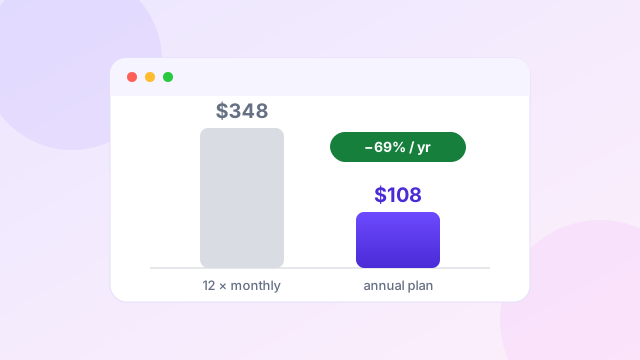
Its annual cost of $108 is higher than FocuSee Standard but lower than keeping the $29 monthly plan all year. The annual plan is easier to justify when you publish every week.
Prefer Screen Studio's focused Mac workflow?
Check the $108 annual plan through our affiliate linkAffiliate link. We may earn a commission at no extra cost to you. Prices checked 20 July 2026.
Read our Screen Studio review and Screen Studio pricing guide before deciding.
How we compared the alternatives #
We used six practical criteria:
- Platform support
- Automatic zoom and cursor treatment
- Editing depth
- Recording and audio sources
- Sharing and team features
- Current public pricing
Feature and price claims were checked on official product pages. We did not label a tool as tested when no hands-on test was performed. This keeps the comparison useful without pretending that every feature works equally well in every setup.
Watch: three Mac recorders compared in under four minutes #
If you want a quick visual overview before digging into the tables above, this short independent video compares the free built-in option, the free power option and the paid polish option on a Mac.
Video summary: In about three and a half minutes the creator recommends QuickTime Player for simple free captures, OBS Studio for free advanced recording and streaming, and Screen Studio for professional-looking videos with automatic zoom and cursor tracking. That matches the decision logic in this guide: pay only when automatic polish saves you real editing time; otherwise a free tool covers basic capture.
Frequently asked questions #
What is the closest Screen Studio alternative?
FocuSee is the closest broad alternative because it offers automatic zoom, cursor effects and auto-editing on Windows and Mac.
Is there a free alternative to Screen Studio?
OBS Studio is the strongest free recorder, but it does not add Screen Studio-style polish automatically. Loom also has a limited free plan for quick shared videos.
What is the best Screen Studio alternative for Windows?
FocuSee is the closest match for polished automatic demos. Tella is better for browser recording and hosted videos, while Camtasia is better for deep editing.
Is Loom better than Screen Studio?
Loom is better for fast team communication and viewer comments. Screen Studio is better for visually polished Mac product demos.
Is Screen Studio better than OBS?
Screen Studio is faster for polished demos. OBS is better for free recording, live streaming and detailed source control.
Related comparisons and guides
 Comparison
Screen Studio vs FocuSee for Automatic Product Videos
The closest cross-platform rival, feature by feature.
Comparison
Screen Studio vs FocuSee for Automatic Product Videos
The closest cross-platform rival, feature by feature.
 Comparison
Screen Studio vs Loom for Better Screen Videos
Polished demos versus fast async team communication.
Comparison
Screen Studio vs Loom for Better Screen Videos
Polished demos versus fast async team communication.
 Comparison
Screen Studio vs Camtasia for Tutorial Video Creation
Automatic polish versus a full multi-track editor.
Comparison
Screen Studio vs Camtasia for Tutorial Video Creation
Automatic polish versus a full multi-track editor.
 Review
Screen Studio Review for Polished Mac Screen Recordings
Strengths, trade-offs and who the app suits.
Review
Screen Studio Review for Polished Mac Screen Recordings
Strengths, trade-offs and who the app suits.
 Pricing
Screen Studio Pricing Explained Before Choosing Your Plan
Monthly vs annual costs and the break-even point.
Pricing
Screen Studio Pricing Explained Before Choosing Your Plan
Monthly vs annual costs and the break-even point.
Sources and editorial note
This comparison was checked against the official pages for Screen Studio, FocuSee, Tella, Loom, Camtasia and OBS Studio on 20 July 2026. The Screen Studio link is an affiliate link and may earn us a commission. Read our editorial policy.